![Notify_Refresh_MasterLogo_CMYK[1]](https://helpcentre.notifytechnology.com/hs-fs/hubfs/Notify_Refresh_MasterLogo_CMYK%5B1%5D.png?width=291&height=117&name=Notify_Refresh_MasterLogo_CMYK%5B1%5D.png)
You can export a Risk Assessment to PDF straight from the record, and choose how much of it to include.
Before you start: you need access to the Risk Assessment you want to export. If it is assigned to you, or it falls within the Risk Assessments you are allowed to view, the Export to PDF option appears when you open the record. If you cannot see the Risk Assessment, you do not currently have access to it.
Steps- Log in to Notify and select Risk Assessments.
- Open the Risk Assessment you want to export.
- Click Export to PDF. This opens a short menu of export options rather than downloading immediately.
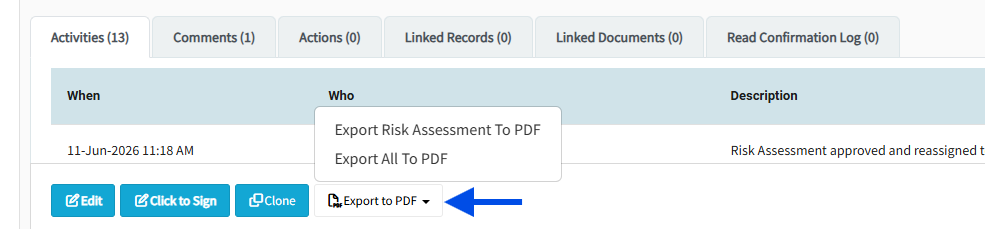
- If you do not want the cover sheet included, tick Hide Cover Sheet On PDF before choosing an option. This checkbox only appears when the assessment has a file in its Cover Sheet (PDF only) panel, and it applies to the Export Risk Assessment To PDF and Export All To PDF options.
- Choose the option you need:
- Export Risk Assessment To PDF: the Risk Assessment document itself.
- Export SSOW to PDF: just the Safe System of Work. This option only appears when the assessment includes a Safe System of Work section, and the download never includes the cover sheet.
- Export All To PDF: the Risk Assessment and the Safe System of Work combined in one PDF.
- Export Read Log To Pdf: the read confirmation log, listing the people who have signed to confirm they have read the assessment. This option only appears when at least one person has signed, and your account needs permission to export read logs.
As soon as you choose an option, the PDF is generated and downloads to your device. If the assessment has a cover sheet, it appears as the front page of the Risk Assessment and Export All downloads unless you ticked Hide Cover Sheet On PDF.
Troubleshooting- You cannot see the Export to PDF button: you do not have access to that Risk Assessment, or it is confidential and you are not its assignee, a confidential delegate, or a confidential Risk Assessment manager. Ask your Notify administrator or the assessment's assignee.
- Export SSOW to PDF is missing from the menu: the assessment does not include a Safe System of Work section, so there is nothing to export.
- Export Read Log To Pdf is missing from the menu: either nobody has signed to confirm reading the assessment yet, or your account does not have permission to export read logs. Ask your Notify administrator about the read log export permission.
- Hide Cover Sheet On PDF is not shown: the assessment has no cover sheet attached, so there is nothing to hide.
- The exported SSOW has no cover sheet even though one is attached: that is expected. The Safe System of Work export never includes the cover sheet.