![Notify_Refresh_MasterLogo_CMYK[1]](https://helpcentre.notifytechnology.com/hs-fs/hubfs/Notify_Refresh_MasterLogo_CMYK%5B1%5D.png?width=291&height=117&name=Notify_Refresh_MasterLogo_CMYK%5B1%5D.png)
Enabling URL based access for a document
Important: Document URL access must be switch on within 'My Company Settings' before it can be applied. Any user with Company Settings Administrator permissions can action this- please see separate guide below:
1. Log in to your Notify account
You can log in to your Notify account here.
2. Go to the Document Management module.
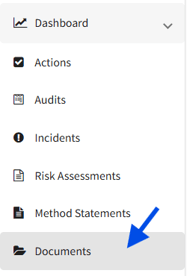
3. Open the published document you want to share, click Edit and navigate down to Share Settings
Once in Share Settings, toggle on Enable Read Only Access. Once enabled, a unique URL and QR code is generated that can be opened directly or protected with a company code, depending on the access level you choose.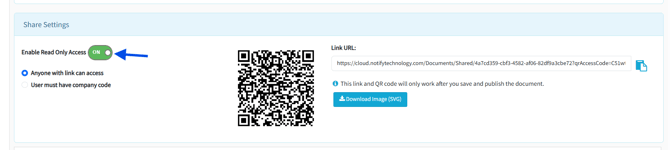
4. Hit Save
Once saved, your QR code and link will be available for you to share with anyone who requires the document.
When should I use URL based document access?
URL based access is ideal when sharing documents with people who do not hold a Notify account.
This includes:
-
Policies and procedures
-
Standard Operating Procedures
-
Safe Systems of Work
Providing instant access ensures everyone has the information they need, when they need it, helping maintain compliance and improve site safety.