![Notify_Refresh_MasterLogo_CMYK[1]](https://helpcentre.notifytechnology.com/hs-fs/hubfs/Notify_Refresh_MasterLogo_CMYK%5B1%5D.png?width=291&height=117&name=Notify_Refresh_MasterLogo_CMYK%5B1%5D.png)
Summary
This release delivers a redesigned PDF export experience, creating more consistent and professional Risk Assessment documents that are ready to share without reformatting.
Alongside this, the release introduces workflow improvements such as raising incidents directly from audits. A small follow-up patch, v8.2.1, will be released shortly after to complete the rollout with additional enablement features, including simplified incident reporting by hiding unnecessary General Details and support for standards and clause metadata in form templates.
Together, these changes reduce reporting friction, improve data quality, and ensure web and mobile workflows remain aligned.
New Features
1. PDF Export Redesign
We’ve redesigned the PDF export across Notify to deliver more consistent, professional, and reliable documents for all export types, including incidents, audits, and risk assessments.
The updated design improves layout, spacing, alignment, and structure, ensuring exported documents are clear, easy to read, and consistently formatted.
The new design applies the same standards across all document types and page orientations, reducing inconsistencies and improving confidence when PDFs are shared internally or externally.
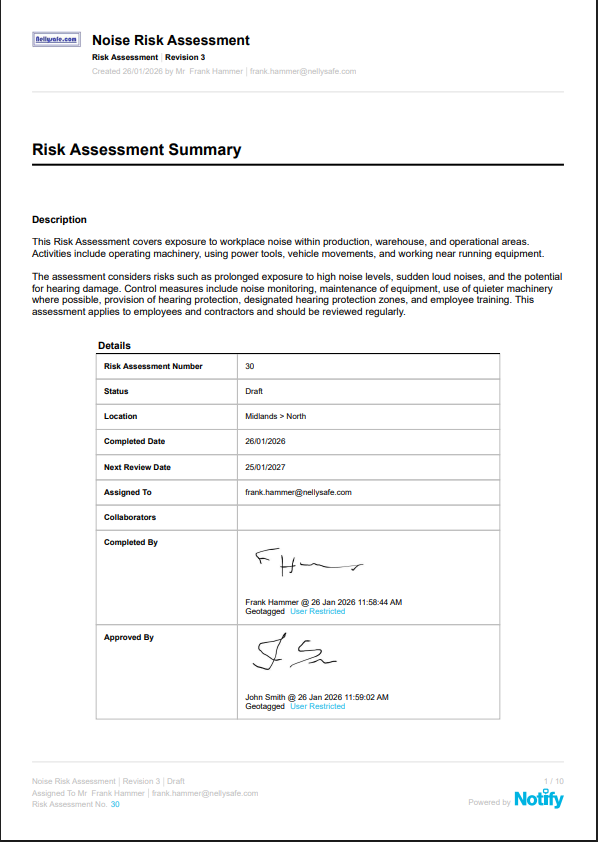
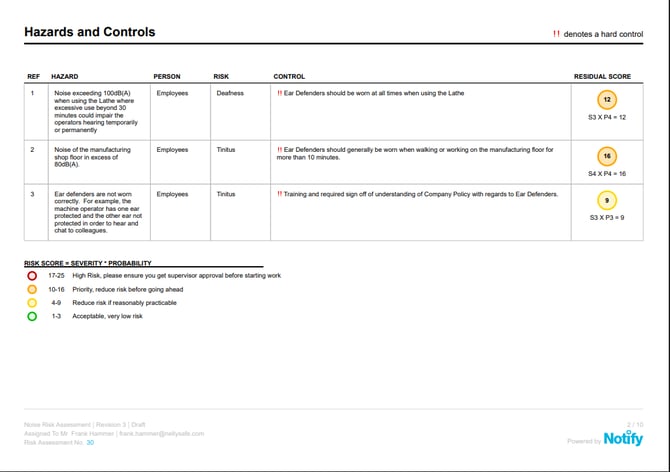
See our new PDF exports
How can the PDF export be used?
For example, a Site Manager exports a Risk Assessment to share with contractors before work starts. The redesigned PDF presents hazards, controls, and responsibilities in a clear, well-structured format that can be shared immediately without editing, helping teams review and understand the assessment quickly and confidently.
2. Raise an incident from within an Audit or Inspection
Users can now raise an incident directly from within an audit or inspection, without leaving the audit workflow.
When an issue is identified during an audit, the Incident Creator allows the user to open an incident report straight from the form. Key details are automatically carried over, including the audit assignee’s name and email, the date and time of creation, and the audit’s location data.
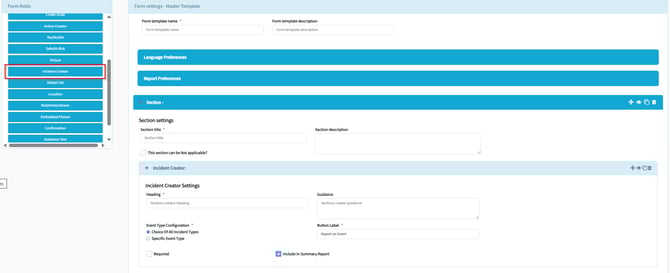
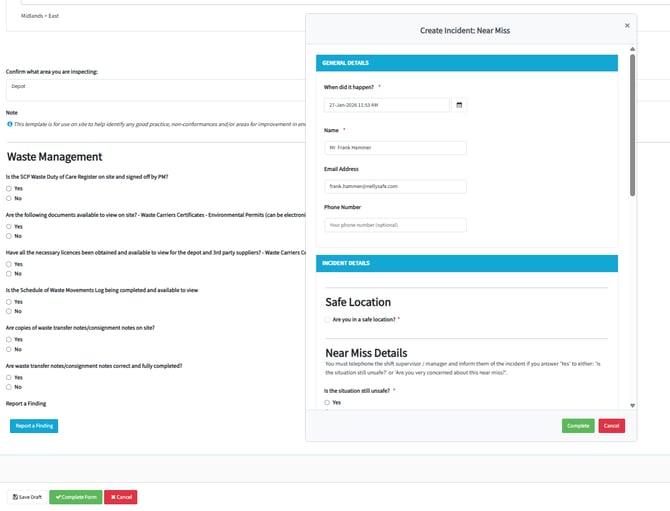
Learn how to raise an incident from within an Audit below
This removes the need to switch between modules or re-enter basic information, making it quicker and easier to log issues as they are found. The option is available only for customers with the Incidents module enabled and will appear greyed out if incidents are not in use.
How can raising an incident from within an Audit be used?
For example, during a machinery inspection, an auditor identifies a safety issue that requires follow-up. Instead of completing the audit and logging the issue later, they raise an incident directly from the audit form. The incident is created with the correct reporter, time, and location already captured, allowing the issue to be recorded immediately and followed up without delay.
3. Raise non-conformances
You can now report non-conformances directly from within an audit or inspection. This means that when you identify a gap against a standard, procedure, or legal requirement, you can record it immediately in the right context, without duplicating work or relying on follow-up actions later. Each non-conformance remains linked to the original audit evidence, creating a clear trail through to corrective action and closure, while helping you demonstrate compliance, prioritise improvements, and reduce unnecessary admin.
*please note, you will require a "Non-conformance" incident type for this to work.
Feature Improvements
1. Hiding general details during incident reporting
Our Customer Success team can now configure incident types to Hide the General Details page during incident reporting.
For incident types where general information is not required, this removes unnecessary steps from the reporting process and allows users to submit incidents more quickly. This is particularly useful for quick-capture scenarios, such as QR code reporting or simple observations.
The configuration supports both simple and more detailed reporting workflows, ensuring users only see the fields relevant to the incident type. The experience will remain consistent across both web and mobile.
Housekeeping
At Notify we call this ‘keeping our lights on!!'. Essentially this is about good housekeeping to ensure the infrastructure, code, third party components and the plumbing we use is maintained, secure and in good working order.
Scheduled downtime
We are really looking forward to delivering this version to you. There will be a scheduled period of downtime on the evening of Wednesday 11th February to allow us to introduce these new features into Notify. We will endeavour to keep any disruption to a minimum.