![Notify_Refresh_MasterLogo_CMYK[1]](https://helpcentre.notifytechnology.com/hs-fs/hubfs/Notify_Refresh_MasterLogo_CMYK%5B1%5D.png?width=291&height=117&name=Notify_Refresh_MasterLogo_CMYK%5B1%5D.png)
Summary
This release includes a new Form Template Builder, improved structuring of Risk Assessments, support for mobile, read and sign access, and stronger governance through approvals and confidentiality controls.
Together, these updates make it easier to create, manage, share, and evidence Risk Assessments consistently across organisations
New Features
1. New Template Builder for Risk Assessments
We’ve introduced a new Template Builder for Risk Assessments, giving greater flexibility over how your templates are structured. Anyone familiar with Notify's Audit templates will be right at home, with a library of pre-built controls and components ready to go.
The new Template Builder introduces several new section types specifically for Risk Assessments - including Hazards & Controls, Safe Systems of Work, and Icons for Mandatory PPE, Hazards and Substance Properties. These sections can be added and organised however you like, giving you full control over your Risk Assessment forms and PDF exports.
Risk Assessment managers can now add basic form controls to their Risk Assessment templates, making it possible to create a much broader range of documents, including checklist-style POWRAs and Dynamic Risk Assessments that can be quickly completed on site before work begins.
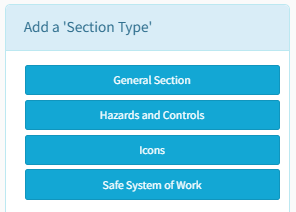
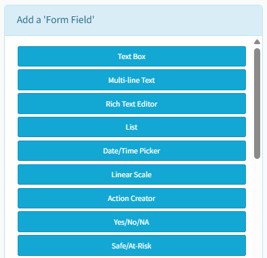
2. Hazards & Controls
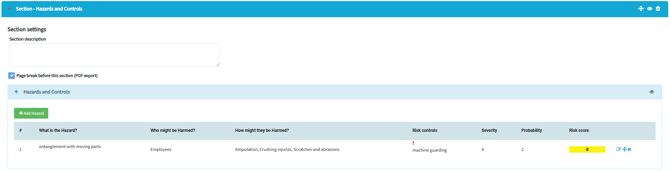
The Hazards & Controls table is now an optional element, available in the Template Builder to be added to a Risk Assessment template, only when you want it.
This means safety professionals can now create Risk Assessments without the Hazards & Controls table if they wish, instead building checklist-style assessments, commonly used for Fire Assessments, POWRAs, Dynamic Risk Assessments and many other use-cases.
Risk Assessments can also now be published with an empty Hazards & Controls table, allowing safety professionals to start a Risk Assessment from scratch.
3. Safe System of Work
The Safe System of Work section is now an optional element, available in the Template Builder to be added to a Risk Assessment template, only when you want it. Better still, now you can choose where in your Risk Assessment template it appears.
Safety professionals can now pre-populate the Safe System of Work section at the template level, ensuring that critical safety precautions are always included in every Risk Assessment. Better still, this default content can now be locked, preventing it from being edited.
4. Icon Checkboxes
We've introduced a new type of Section that can be added to any Risk Assessment template - Icons. This replaces the old Mandatory PPE Section, where risk assessors selected items of PPE mandated for a specific task.
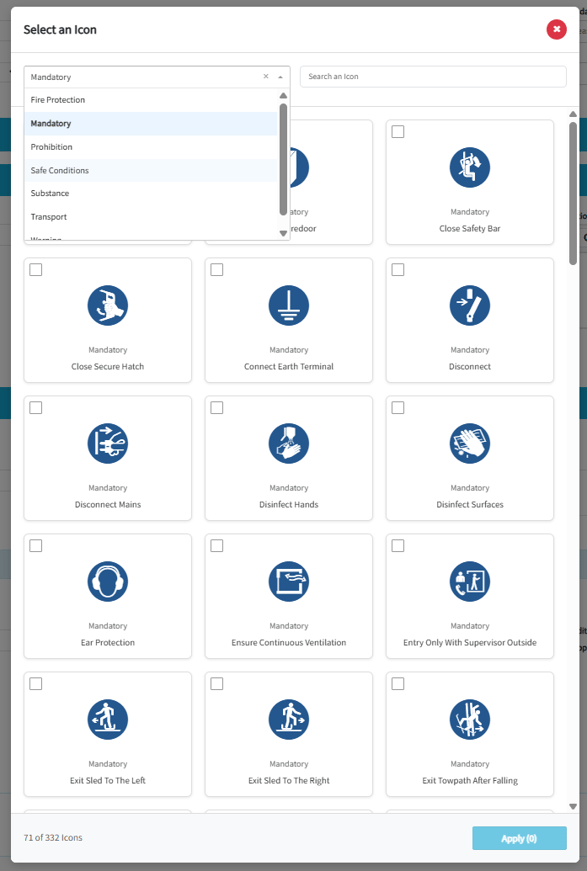
Once you've added an Icon Section to your Risk Assessment template, you can add as many icons as you like, give each one a custom label, and then choose an icon from an enormous library of ISO 7010 standard images.
This means safety professionals can now create icon-based checkboxes for any purpose - for example, allowing risk assessors to specify an unlimited number of Mandatory PPE for a given task, or visually represent on-site hazards using industry standard icons.
Notify's Icons Section supports the full range of ISO 7010 images, from the following categories:
- Substance Properties
- Hazards
- Prohibited Items/Actions
- Fire Safety
This means safety professionals can now create rich, visual documentation that conveys risk quickly and clearly using industry-recognised graphics. It also means that they can include an unlimited range of PPE options, including wildcards for unique or industry-specific equipment.
5. Locked & Default Content
It's now possible to set default content to be pre-populated in your Risk Assessment templates for Rich Text, Multi-line and Single-line Text fields.
Risk managers can now pre-populate templates with standard guidance and company-mandated controls or instructions that should be included in every Risk Assessment.
This speeds up the risk assessment process, and ensures that Risk Assessments follows organisational standards of best-practice.
Want an entirely blank template? You can do that too - default content is entirely optional.
Editable vs Locked Content
It's now possible to prevent company-mandated guidance and controls pre-populated in a Risk Assessment template from being changed or deleted during the risk assessment process.
Risk managers can choose whether default content and controls pre-populated in a template are editable or locked. Anything set as editable can be changed by the risk assessor at their own discretion. Anything set as locked will not be editable at all.
This allows safety teams to ensure that company-mandated content and controls are included in every Risk Assessment as standard, even across very large deployments across many sites and locations.
This extends to the Hazards & Controls table, where hazards and controls can be locked to prevent editing or removal.
This provides stronger governance control for large teams, allowing them to strike a balance between standardisation and flexibility, ensuring critical safety information is always included, regardless of who is conducting the Risk Assessment.

6. Conducting a Risk Assessment via a QR Code
It's now possible to start a Risk Assessment on a mobile device by scanning a QR Code, or clicking a hyperlink. Combined with the ability to create checklist-style Risk Assessments, this allows frontline teams to quickly carry-out pre-task assessments on-site with the tap of a button.
This allows safety teams and frontline staff to quickly complete point-of-work Risk Assessments out on site, in context, where and when the activity is about to take place - exactly where it should be done.
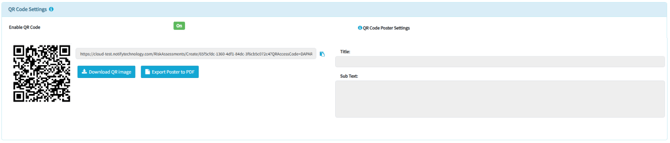
7. Read & Sign via QR Code
Published Risk Assessments can now be shared via hyperlink and QA Code. This means that any individual - even those who do not have a Notify login - can scan a QR Code or click on a hyperlink to view a read-only version of the Risk Assessment in a web browser.
If digital signatures are turned on, they will be able to sign with their finger-tip to confirm they've read and understood the Risk Assessment, captured along with a timestamp for your audit trail.
This means it's now possible to distribute published Risk Assessments to any individual inside or outside your organisation, including frontline contractors who do not otherwise have access to Notify.
Links and QR Codes can be protected by company code, if you wish.
8. Search by Signatory
Safety professionals can now search for Risk Assessments signed by an individual, by name. Simply type the person's name into the search field and see a list of Risk Assessments signed by that person. This allows operational teams to ensure all new starters have read and signed important documentation before beginning work on site. It also allows safety teams to find out exactly which Risk Assessments were read and signed by an individual prior to an incident or accident taking place.
9. Confidential Risk Assessments
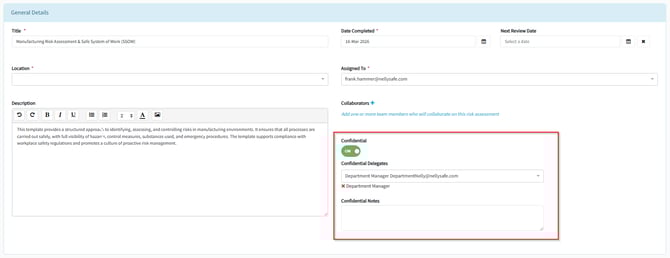
Risk Assessments create in Notify can now be marked as Confidential, allowing organisations to restrict access to sensitive assessments. This might include Risk Assessments for new and expectant mothers, young persons or certain health conditions.
Better still, this can be set at the template level, meaning all Risk Assessments created from a specific template can be automatically flagged as Confidential, ensuring personal information is protected by default.
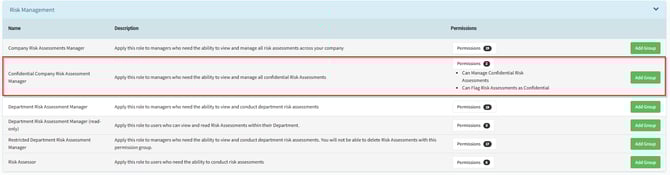
This comes with new permissions and delegation processes to control who can mark Risk Assessments as Confidential, as well as who can see, edit and delete them.
10. Controlled Approval Process
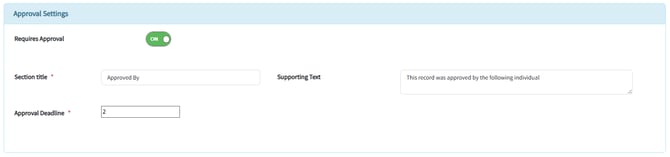
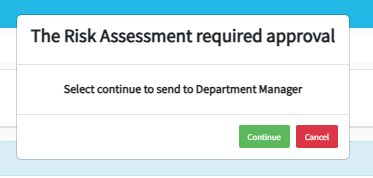
Risk Assessments now have an optional approval process. When enabled on a template, this new workflow prevents Risk Assessments from being published until they've been signed off by a nominated Approver.
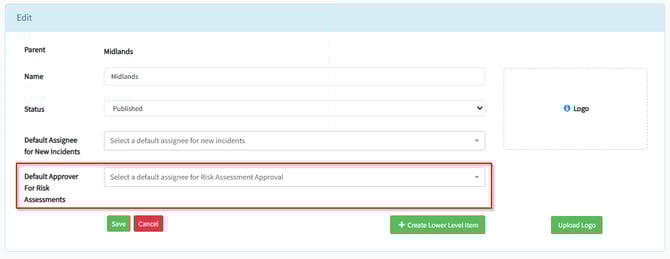
Default Approvers can be set for each location and are automatically assigned to Risk Assessments when they're published, with the ability to delegate to a colleague in case of absence or annual leave.
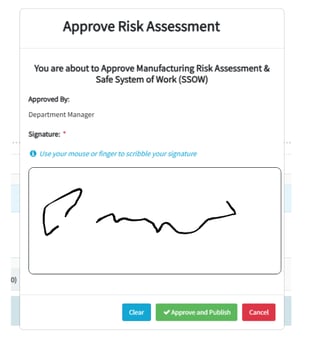
Risk Assessment authors can no longer approve their own work, providing safety teams with stronger governance controls, and better assurance across large, distributed workforces.
Approval is entirely optional and is set at template level. When enabled, all Risk Assessments based on that template must go through an approval process before they can be published to the business. Changes to a Risk Assessment are even prohibited while awaiting approval, to avoid confusion.
A reasonable timeframe for each approval can the set, followed up by automated reminder emails once the deadline has passed and the approval becomes overdue.
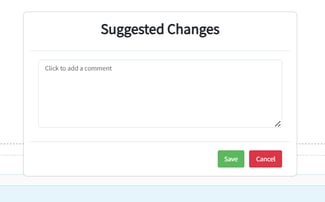
All approvals are marked with a digital signature and timestamp, with the option to reject the Risk Assessment with suggested changes.
Of course, all of this is evidencable in a clear, comprehensive audit trail.
UX Improvements
1. Section Level Page Breaks
Do you like clean, well-spaced documents that are easy to read, or do you prefer shorter, condensed documents that span fewer pages? In reality, everyone has their own preference.
Template managers now have more control over how their Risk Assessment PDF exports are spaced out, allowing them to create a document that meets their individual needs.

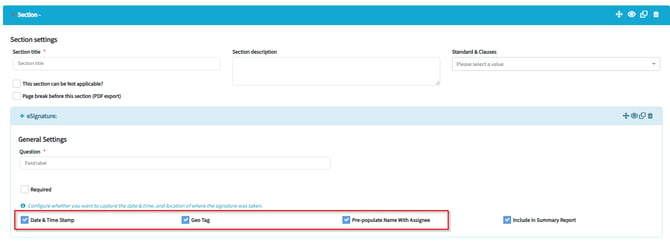
2. Digital Signature Defaults
Digital signature fields now have geolocation and date/timestamp turned on by default. This means every electronic signature will automatically capture when and where it was signed, unless it is explicitly disabled.
This additional data adds evidential weight to Simple Electronic Signatures (SES) captured in health and safety documentation yet is often overlooked when configuring a form. This new default setting will ensure it is never forgotten but can be disabled if desired.
3. Compliance Metadata
Risk Assessment & Audit templates can now be tagged with a specific Standard (e.g. ISO45001). Not only that, but every Section within a template can be tagged with a specific Clause within that Standard too.
This update gives business leaders valuable compliance visibility. Audit scores and failures can now be attributed to specific Standards & Clauses - critical metadata that can be used in data analysis tools to assess compliance weak-points across the whole business.
In time, this metadata will be available in Notify's extended dashboards. In the meantime, it can be extracted from Notify via CSV exports and public API responses.
Public API - targeting April 2026
We've made a number of updates to our public API.
First up is our new Risk Assessments v2 endpoint, supporting our updated Risk Assessment templates. This allows customers who pull Notify data into other tools, such as Snowflake or Microsoft Power BI, to extract data from our new Risk Assessments.
Endpoints for Audits, Incidents, and Method Statements all include both template and section-level Standards & Clauses metadata. This allows anyone using third party data analysis tools to segment their Notify data based on compliance requirements.
Finally, the endpoint for Audits & Inspections now includes Audit Category metadata. This allows anyone using third party data analysis tools to segment their Audit data by Category.
Follow up web release - targeting May 2026
1. Approval Deadline Reminders
Risk Assessment Approvers can now subscribe to approval deadline reminders. With this setting enabled, Approvers will receive daily reminder emails for any Risk Assessments that have passed their approval deadline and have become overdue. This improves Risk Assessment governance by ensuring all approvals are followed up and completed in a timely manner.
2. Approval Deadline Reminders
Risk Assessment managers can now copy and paste Hazards & Controls tables from one template to another, without having to re-type them from scratch. This is useful for companies with large numbers of templates.
3. Activity Tracking
The Activity Log has been expanded to include more information about what changed in a Notify record, including both the previous value and what it was changed to. This update improves governance and traceability, providing a more comprehensive evidence trail, where it is needed most.
Naturally, this creates substantially more activity data, so we've introduced pagination to the Activity Log, loading the audit trail in manageable segments to keep Notify running quickly and efficiently.
UX Improvements
1. PDF Export Improvements
We've introduced the option to include a company logo in the footer of PDF exports. This ensures that exported documents are recognisable beyond the front page.
2. Incident Description in Incident Creator
The Incident Creator table within Audits & Inspections now displays the Incident Description, allowing users to see more detail about the incident raised, without needing to open the full incident record.
Scheduled downtime
We are really looking forward to delivering this version to you. There will be a scheduled period of downtime on the evening of Wednesday 8th April to allow us to introduce these new features into Notify. We will endeavour to keep any disruption to a minimum.